
Android Auto and CarPlay app
Drivvo on Android Auto and CarPlay
Gas stations with prices, fill-ups, odometer readings and reminders on your car screen, without picking up your phone.
- Android Auto on Android and CarPlay on iPhone
- The cheapest gas station on your way, with the price of each fuel
- When parked, logging a fill-up takes just a few taps

Rated 4.8 on Google Play, with more than 5 million downloads
Free, with the app on version 12.0 or newer.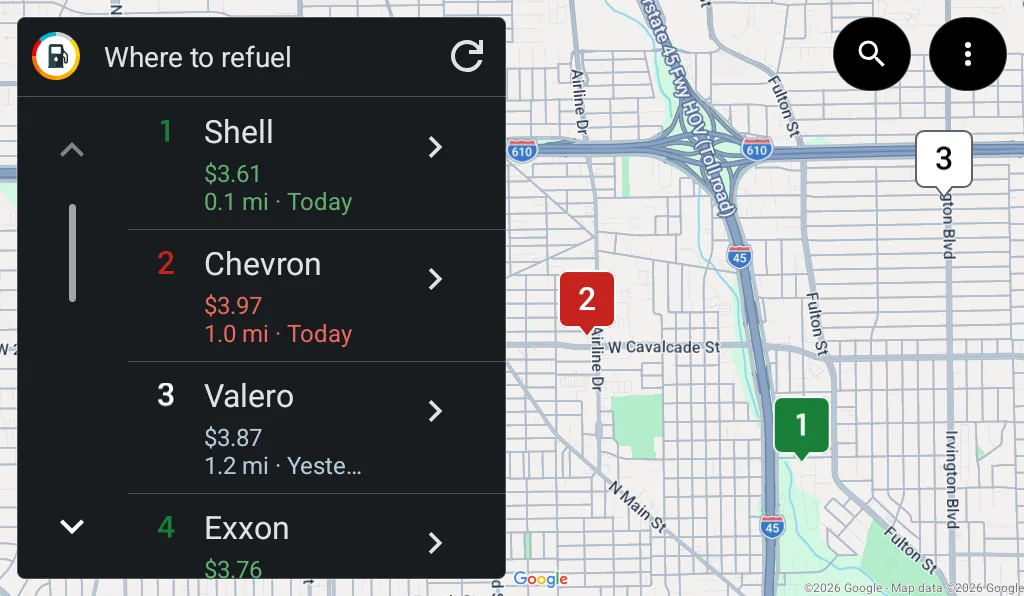
Everything Drivvo does in the car
The app's most used features on the dashboard screen, with big buttons and short text, as Google and Apple require for car apps.
Gas stations with prices
On the map and in a list, with the price, the distance and when it was reported.
Address search
See the stations near another place before you leave.
Go to the station
One tap and navigation starts.
Fill-ups
Station, fuel and price come pre-filled.
Odometer readings
Log your mileage without filling up.
Reminders
What is coming due, by date and by mileage.
Everything in sync
What you log in the car shows up on your phone and on the web.
Where to refuel
Gas stations near you, with the price of each one
- A map with numbered stations and the list next to it
- The price of the fuel you picked, the distance and when the price was reported
- When a price is more than 30 days old, the station shows no recent price
- Search an address to see the stations there, and get back to the car's surroundings with one tapAndroid Auto
- below the area average
- above average
- average
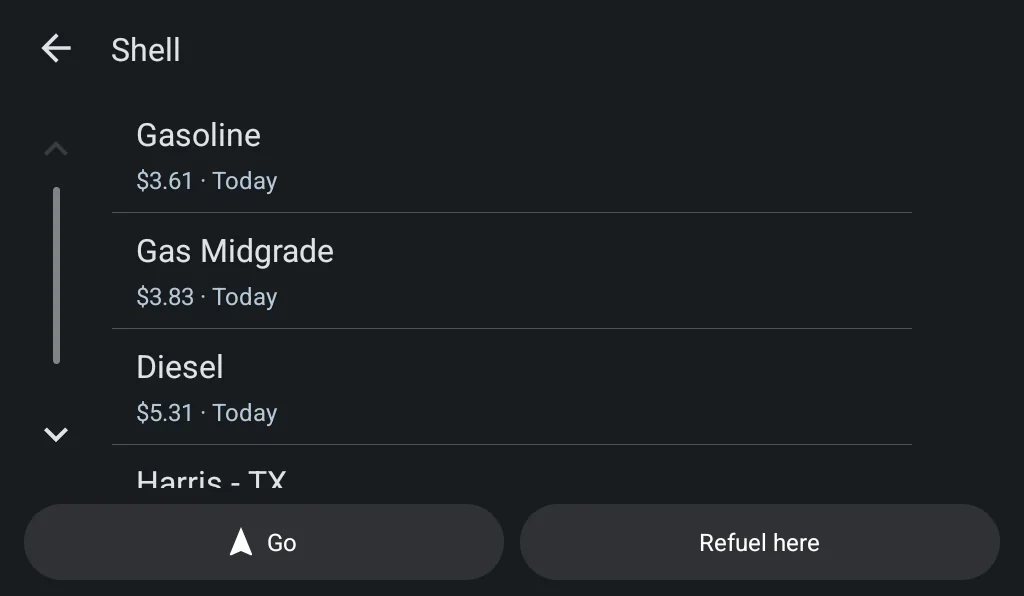
Station details
Pick the station and go
- The price of every fuel at the station and when each one was reported
- Address and distance from the car
- Go starts navigation to the station
- Refuel here opens the fill-up form with the station already picked
Refueling
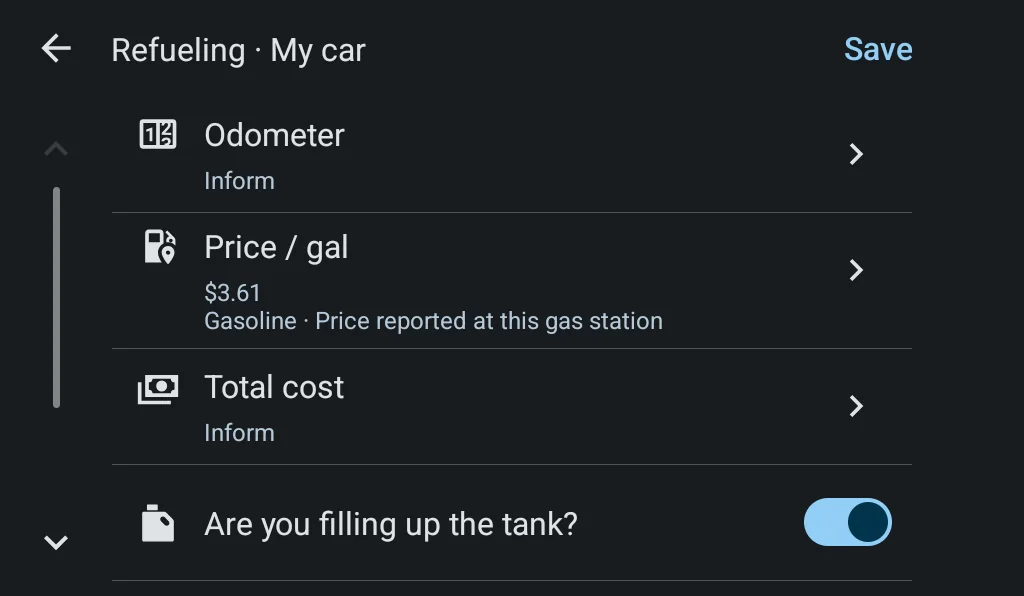
Log a fill-up in a few taps
- The station comes from the car's location
- Fuel and price come pre-filled with the price reported at the station
- You enter the odometer and the total, and mark whether you filled the tank
- An odometer lower than the last one or an unusual price gets a warning, just like on the phone
- No time right now? Finish on phone saves a draft and sends a notification so you can complete it later
On CarPlay, the odometer comes estimated from your average and you adjust it with the +1, +10 and +100 buttons; the total comes from the amounts you pay most often.
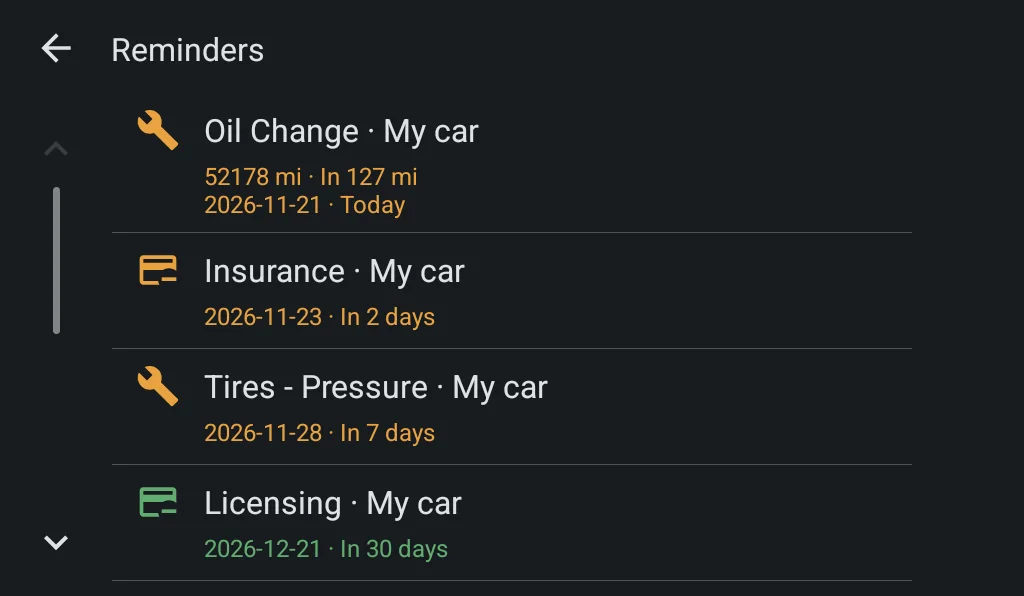
Reminders
The reminders that are coming due
- Oil change, service, insurance, registration and anything else you added
- By date and by mileage, with how much is left for each one
- overdue
- coming due
- with time left
What changes between Android Auto and CarPlay
The features are the same. Each system draws the screen its own way, and Drivvo follows the rules of each one.
| What changes between Android Auto and CarPlay | Android Auto | CarPlay |
|---|---|---|
| Home screen | Map with the station list; search and more options in the map bar | Three tabs: stations, logging and reminders |
| Odometer and amounts | Number keypad, when parked | Estimated odometer with the +1, +10 and +100 buttons; total from the amounts you pay most often |
| Address search | Yes | No |
| Price and due date colors | Yes | No, CarPlay does not color text |
Made for use in the car
Typing only when parked
The keypad and confirmations only work when the car is parked, as Google and Apple require.
Big buttons, short text
No charts or reports on the dashboard: they stay on the phone and on the web.
The rest can wait
Anything that needs the phone shows up as a note to do when parked, or as a notification.
How to get started
Install or update Drivvo
Version 12.0 or newer, on Google Play or the App Store.
Sign in and add your vehicle
On the phone, while parked. The car uses your main vehicle.
Connect your phone to the car
With a cable or wirelessly, the way you already use Android Auto or CarPlay.
Tap Drivvo on the car screen
The first time, allow location on your phone to see the stations.
Fleet Management
For fleet drivers too
Drivers log fill-ups and readings from the car screen, on the vehicle you assigned and with their profile's permissions. The manager sees everything in Drivvo Web.
Explore fleet managementFrequently asked questions
Does Drivvo work with Android Auto and CarPlay?
Yes. With your phone connected to the car, Drivvo shows up on the dashboard screen: nearby gas stations with the price of each fuel, navigation to the station, reminders that are coming due and, when parked, logging fill-ups and odometer readings. On Android it works through Android Auto and on iPhone through CarPlay, with the app on version 12.0 or newer.
Do I need a subscription?
No. In the car, stations, fill-ups, odometer readings and reminders are available on every plan, including Free.
Drivvo doesn't show up in my car. What should I do?
Update Drivvo to version 12.0 or newer, open the app on your phone, sign in and check that you have a vehicle added. Then connect to the car again.
Can I type while the car is moving?
No. The keypad and confirmations only work when the car is parked, under Google and Apple rules. While driving, you can see stations, prices and reminders and start navigation.
Does what I log in the car show up on my phone?
Yes. The entry is saved in the app and synced with your account, so it shows up on your phone and in Drivvo Web.
Does it work for fleets?
Yes. Drivers use Drivvo in the car with the vehicle assigned to them and their profile's permissions, and the manager follows along in Drivvo Web.
Bring Drivvo to your dashboard
Free on Android and iPhone. Connect to your car and Drivvo shows up on Android Auto and CarPlay.