
Mileage log: every trip recorded and the reimbursement calculated
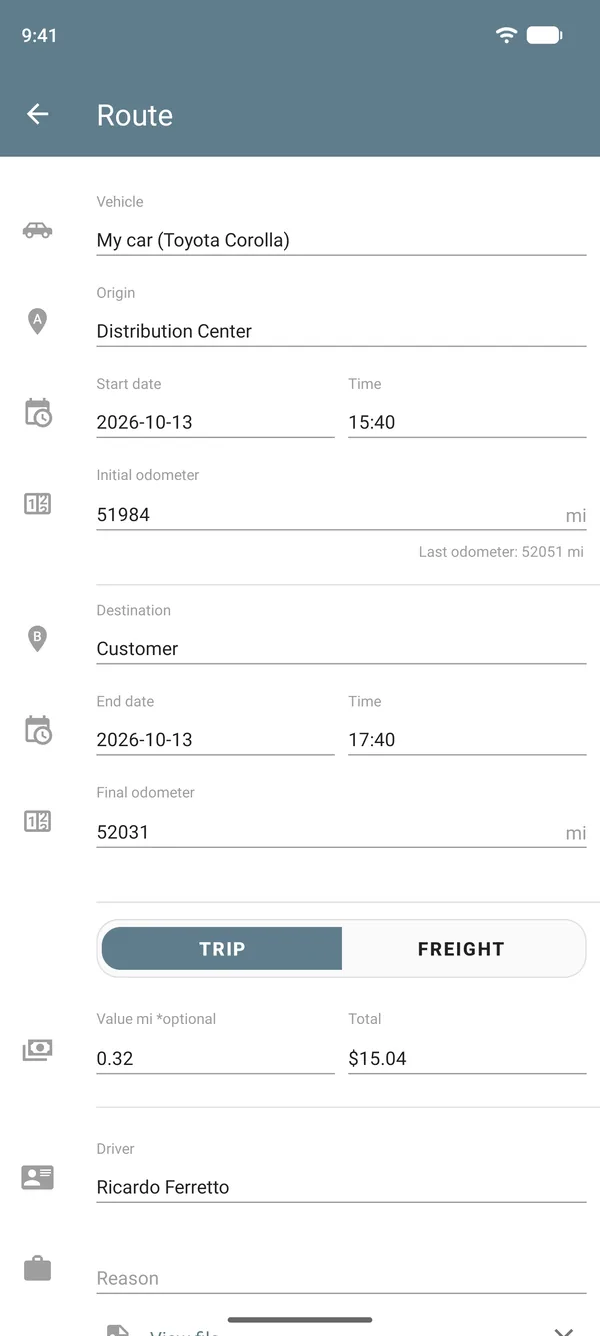
Note where you left from, where you arrived and the odometer at the start and at the end. Drivvo works out the distance, the trip value and the month's total, split by reason.
- Trips with origin, destination, odometer and reason
- Reimbursement calculated from the distance
- The month's mileage, ready to show whoever pays


Rated 4.8 on Google Play, with more than 5 million downloads
Reimbursement per km calculator
Enter the odometer at departure and arrival, or just the distance, and the amount the company pays per km.
Result
Enter both odometer readings, or the distance, and the value per km.
In Drivvo, the value of each trip comes out on its own, and the report adds up the month.
What a mileage log is
A mileage log is the record of each trip: the date and time, where you left from, where you arrived, the odometer at departure and arrival, and the reason. The distance is the arrival odometer minus the departure one.
With this record, a company pays the right reimbursement to people who use their own car, professionals can prove the distance driven for work, and it is easy to separate work trips from personal use.
How to log a trip in Drivvo
You open the trip when you leave and close it when you arrive. The app does the math.
Open the trip
In Route, choose the Origin and the Destination, the date and the Initial odometer, and enter the value per km. Save: the trip stays open.
Close it when you arrive
In History, tap the trip, enter the Final odometer and save. The app works out the distance and the Total: the distance times the value per km.
See the total for the period
In Reports, the Route tab shows the value, distance and time of your trips for the period you choose.
Today Drivvo does not record the route by GPS: the distance comes from the odometer, which is the number on the dashboard and also the proof of the trip.
How to calculate reimbursement per km
Multiply the distance driven for work by the value per km agreed with the company. Example: a distance of 120 at 1.50 per km gives 180 in reimbursement.
Tolls and parking are usually paid separately, with a receipt. In the app, they go in as an Expense, with the Toll and Parking types that already come with the account.
How much to pay per km driven
There is no single rate: each company sets its own in its reimbursement policy. Some countries have a government reference rate or tax rules; check the rules where you live.
The rate usually covers fuel, maintenance, tires, insurance and wear on the car. To reach a fair number, use the real cost: in the app's reports, the vehicle's cost per km brings all these costs together.
Work trip or personal trip
Each trip can have a Reason. The account comes with Work and Personal, and you can create others in More > Reasons. On the Web, the report filters by reason and adds up only the work trips.
Mileage report
- Value of the trips: total, per day and per km
- Total distance, average per trip and average per day
- Total and average trip time
- Charts of the value and distance for each month and the most common destinations
- On the Web, several vehicles side by side and filters by driver, reason and place
- Export to a spreadsheet or PDF on the paid plans
Reading
Monthly mileage with odometer readings
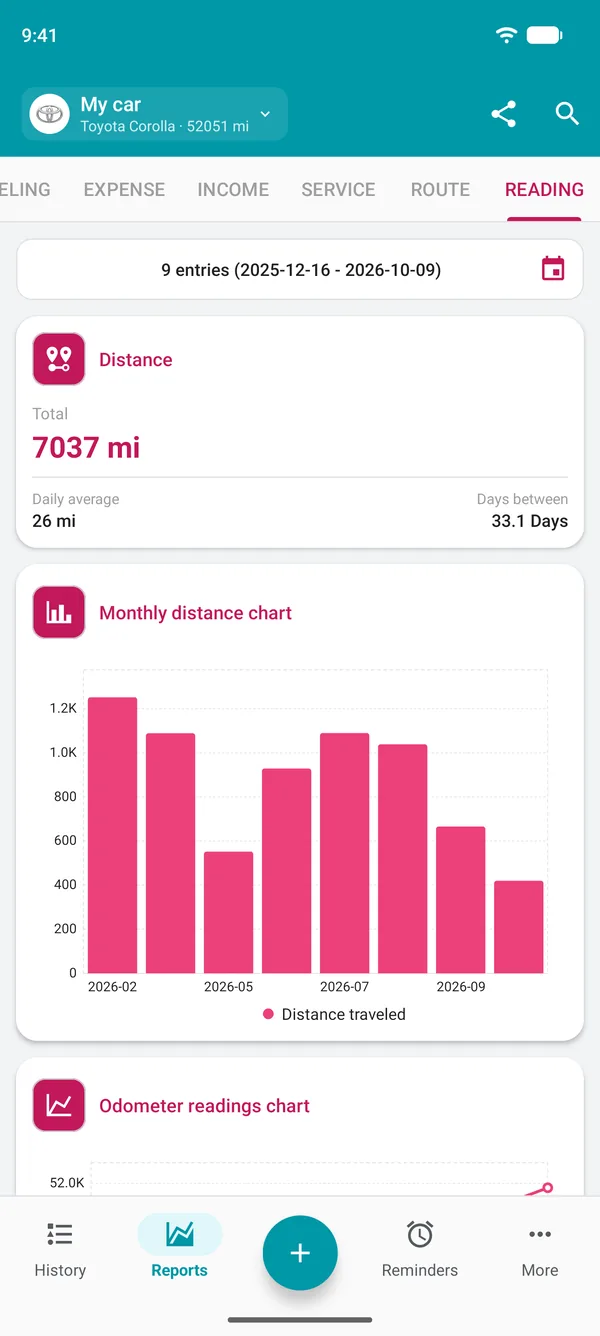
If you only need to know how much the car was driven in the month, use Reading: note the odometer at the start and at the end of the month, with no value. The report shows the distance for the period, the daily average and a month-by-month chart. An up-to-date odometer also makes maintenance reminders more accurate.
Mileage tracking for fleets
- Drivers log trips on their phone, even offline.
- The Driver profile sees only its own records, on the vehicles assigned to it.
- The manager sees every trip on the Web, filters by driver and period, and compares vehicles.
- An employee's car joins the company account as a vehicle, and its trips sit alongside the fleet's.
- A photo of the odometer can be attached to the trip, on the paid plans.
Spreadsheet, paper or app
On paper or in a spreadsheet, someone has to type and add everything up later, and receipts get lost. In the app, each trip is recorded on the spot, with the date and odometer, and the month comes out already added up.
Prefer to start on paper? Print the mileage log template below. It has the columns of a mileage log and space for signatures.
Frequently asked questions
How do I keep track of my car's mileage?
Note the odometer at departure and arrival for each trip, with the reason. If you only need the month's total, note the odometer at the start and end of the month. In Drivvo, both ways turn into a report.
Which app should I use for a mileage log?
Drivvo logs each trip with origin, destination, odometer and reason and works out the distance and value. It works on Android, iPhone and the Web and is free for personal use.
Does Drivvo track mileage by GPS?
Not today. The distance comes from the odometer you enter at departure and arrival. The app does not need to stay open during the trip.
How do I calculate reimbursement per km driven?
Multiply the work distance by the agreed value per km. Add tolls and parking separately, with receipts. The calculator on this page does the math.
What is the reimbursement rate per km?
There is no single rate: each company sets its own. Use the vehicle's real cost as a basis and check whether your country has a reference rate or tax rules.
How much does each km driven cost?
Add up all the vehicle's costs for the period and divide by the distance driven. In Drivvo, the cost per km shows up in the reports.
What should a vehicle mileage log include?
The date and time, origin and destination, the odometer at departure and arrival, the distance, the reason and the driver. The template on this page has all these columns.
How do I separate work trips from personal ones?
Use the Reason field on each trip. On the Web, the report filters by reason and adds up only the work trips.
How do I know how far the car was driven in the month?
Log a Reading of the odometer at the start and end of the month, or add up the month's trips. The report shows the distance and the daily average.
Spreadsheet or app: which is better?
A spreadsheet depends on someone typing everything in later. In the app, the trip is recorded on the spot and the month comes out already added up. If you need a spreadsheet, you can export your records on the paid plans.
How does a company track each driver's mileage?
Each driver logs trips in the app, and the manager sees them all on the Web, filters by driver and period, and exports the report.
Is mileage tracking free?
For personal use, yes: trips, odometer readings and reports are free. Exporting, attaching files and using the driver field are part of the paid plans. For companies, the Fleet plan has a 15-day free trial.
Log your next trip
Download Drivvo, note the odometer when you leave and when you arrive, and see the reimbursement calculated.
Tracking mileage for a team? Discover the Fleet plan