
How much does it cost to own a car each month?
The cost goes far beyond gas. Insurance, taxes, maintenance, loan payments, and small everyday expenses add up. Get an estimate here, then track your actual costs in Drivvo.
- Monthly cost calculator, no sign-up required
- Car loan and insurance costs broken down by month
- Cost per day and per mile in app reports


Rated 4.8 on Google Play, with more than 5 million downloads
Vehicle cost calculator
Enter what you spend. Yearly costs are divided by 12 and added to your monthly costs. Leave anything that doesn't apply blank.
Result
Enter at least one cost to see the total.
This is an estimate based on the numbers you entered. In Drivvo, the actual cost comes from your records, month by month.
What goes into the cost of owning a car
A car's costs fall into three groups. If you only add up fuel, you'll think the car costs much less than it does.
Fixed costs
Insurance, vehicle taxes and fees, car payments, and parking at home. You pay them even if the car sits still.
Variable costs
Fuel, maintenance, tires, parking, tolls, car washes, and fines. They go up the more you drive.
Loss of value
The car is worth less every year. This cost does not come out of your pocket each month, but it shows up when you sell it.
How to calculate your car's monthly cost
- Add up the costs you pay once a year, such as insurance and taxes, and divide by 12.
- Add up the costs of a typical month: fuel, car payments, parking, and the rest.
- Add the two amounts together. That's your monthly cost.
- For the cost per mile, divide the cost for the period by the distance driven in that same period.
Always use the same period. A month with maintenance or new tires costs more; the average over a year shows the real cost.
How to log your costs in Drivvo
Log each cost as it happens, on your phone or computer. The app adds everything up and breaks it down by type.
Log the expense
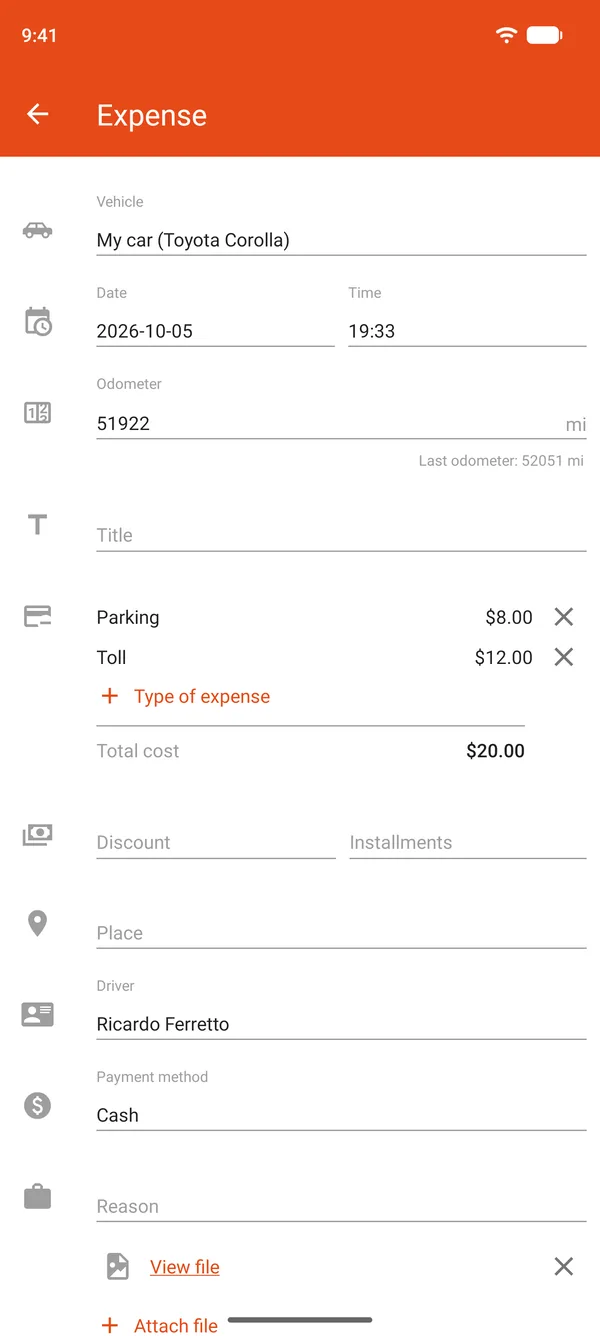
In Expense, select one or more expense types, each with its own amount. The Total cost adds up automatically. The discount, payment method, and location help keep things organized.
Split it into installments
For a car loan or insurance, enter the total amount, the Installments, and the Period. Each installment counts in the month it's due, and the app shows how much you've paid and how much is left.
See where the money goes
In Reports, the Expense tab shows the total, the amount per day and per mile, and the chart for each month.
Car loan, insurance, and taxes in installments
Paying for insurance in 6 installments shouldn't make the first month look more expensive than the others. In Drivvo, the total is split into up to 99 installments, due weekly, every two weeks, or monthly. Each installment counts in the month it's due.
- Each month's cost is accurate, with no spike in the month you paid
- The expense screen shows installments paid and remaining
- It also works on the Free plan
- To remember to renew, create a reminder that repeats every year
Where your vehicle expenses go
The app's reports answer questions a calculator can't, using your actual numbers.
- How much your vehicle cost this month, this year, or over any period you choose
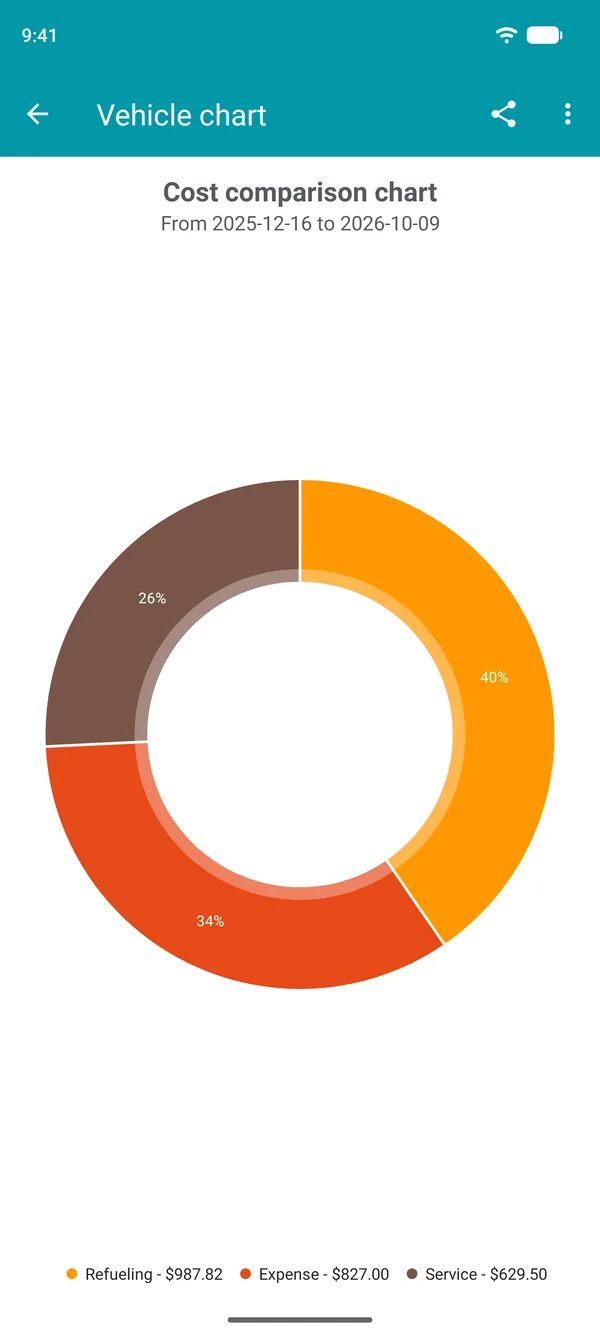
- The share of the total spent on fuel, expenses, and services
- Each month's cost compared with previous months
- The expense types that cost the most, such as insurance or parking
- The cost per day and per mile
Cost per mile: compare months and vehicles
Your total cost changes as you drive more or less. The cost per mile shows how much each mile driven costs, so you can compare months or vehicles. Drivvo calculates it automatically from the odometer readings in your records.
Car expense spreadsheet or app
Prefer to write it down? Print the template, record each expense for the month, and add them up at the end. The columns and monthly summary are already there.
A spreadsheet only adds up what someone enters later. In the app, you log each cost as it happens, and the cost per month, per day, and per mile appears automatically. If you already have a spreadsheet, Drivvo support can import its data into the app. Exporting your records to a spreadsheet is available with paid plans.
Frequently asked questions
How much does it cost to own a car per month?
There is no single figure: it depends on the car, how much you drive, and the insurance and taxes where you live. Divide your annual costs by 12 and add them to a typical month's costs. The calculator on this page does the math, and Drivvo shows your actual cost based on your records.
What are the costs of owning a car?
Fixed costs, such as insurance, taxes, car payments, and parking at home; variable costs, such as fuel, maintenance, tires, parking, tolls, and fines; and the car's loss of value over time.
What do you pay for a car every year?
Usually insurance and vehicle taxes and fees, which vary by country, plus scheduled maintenance. Divide the total by 12 to see how much to set aside each month, and create a reminder so you don't miss a due date.
How do I calculate my car's cost per mile?
Divide the cost for a period by the distance driven during that same period. In Drivvo, the reports show the cost per mile, calculated from the odometer readings in your records.
How much do I need to earn to own a car?
It depends on what your car costs. Start with your actual monthly cost, including annual costs divided by 12, and see how much of your income it takes.
Is owning a car worth it?
Compare your car's monthly cost with alternatives such as public transit, rideshare apps, or renting a car. The calculator gives you a number, and the app tracks it month by month.
How do I log a car loan or insurance in installments?
Create an expense with the total amount and enter the installments, the payment schedule, and the first installment. Each installment counts in the month it's due. This also works on the Free plan.
How do I see how much I spent on my car this month?
In Reports, select the current month in the date filter. In History, each month has a summary of spending, distance, and average fuel economy.
Can I track my car expenses in a spreadsheet?
Yes. You can print the template on this page or save it as a PDF. In the app, the math is done for you. If you already use a spreadsheet, Drivvo support can import your data. Exporting to a spreadsheet is available with paid plans.
Which app tracks vehicle costs?
Drivvo brings expenses, fill-ups, and services together in one account and shows costs per month, per day, and per mile. It works for cars, motorcycles, and trucks on Android, iPhone, and the Web.
Is Drivvo free?
The Free plan lets you log unlimited expenses, fill-ups, and services, with installments and reports, for up to 2 active vehicles. It includes ads. Paid plans remove ads and unlock more vehicles, data export, and attachments.
Can I see the costs of two cars together?
In the app, reports show one vehicle at a time. On the Web, the All option adds up the costs for your vehicles and shows them side by side.
Start with your next expense
Download Drivvo, log your vehicle costs, and see what it really costs month by month.
Want to track fuel consumption and maintenance too? See everything Drivvo does for personal use