
Rideshare and delivery driver tracker: earnings, costs, and profit per mile
Log what you earn and what you spend on your vehicle. Drivvo adds it all up and shows what you have left for the month and how much you make per mile driven.
- Earnings from each app, tracked separately
- Fuel, maintenance, and vehicle rental in one place
- Balance for the period, per day, and per mile


Rated 4.8 on Google Play, with more than 5 million downloads
Profit per mile calculator
Use your numbers from a week or a month. Include all the distance you drove, even without a passenger or delivery.
Result
Enter your earnings and distance to see your profit per mile.
This is an estimate based on the numbers you entered. Drivvo calculates it automatically from your records for any period you choose.
What financial tracking means for rideshare drivers
It means recording what comes in, such as ride fares, deliveries, tips, and bonuses, and what goes out, such as fuel, maintenance, vehicle rental, insurance, and car washes.
What lands in your account isn't profit. Profit is what's left after costs. Divide it by the distance driven to get your profit per mile, the number that tells you whether a week of work paid off.
How to track earnings and costs in Drivvo
Log them on your phone or computer, and the app does the math.
Log your earnings
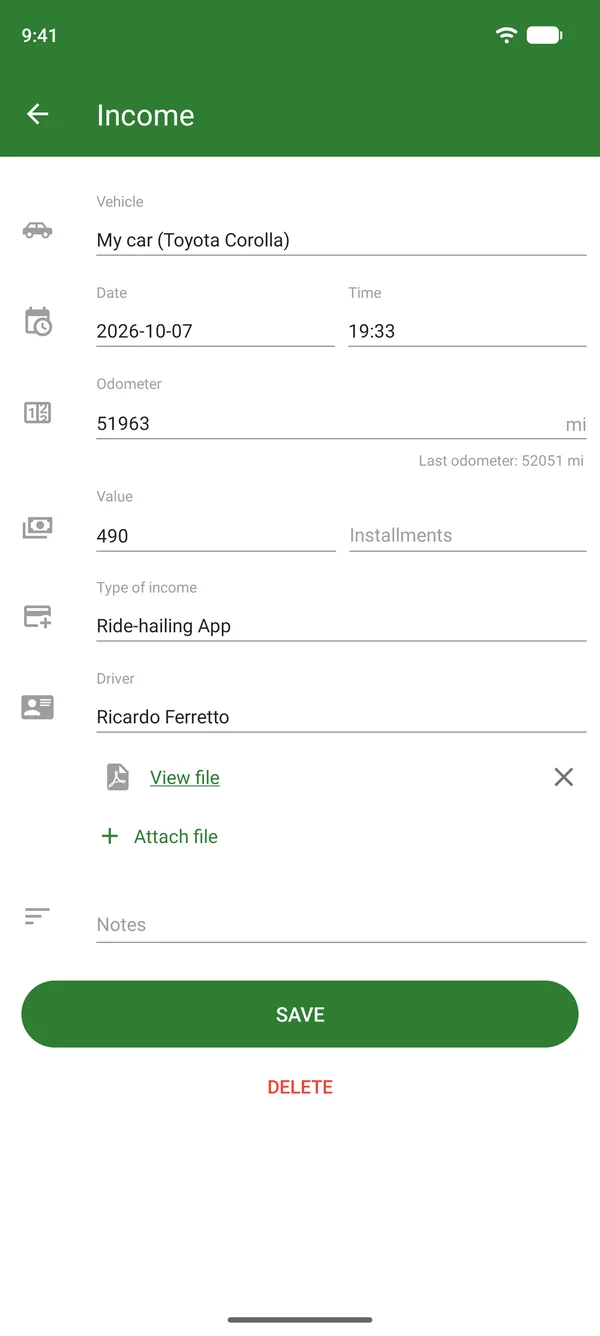
In Income, enter the amount, date, and Type of income, such as Ride-hailing App. You can enter it per ride, per day, or as a monthly total.
Log your costs
Log fill-ups, expenses like rental and insurance, and maintenance services. Each cost is assigned to that vehicle.
See what's left
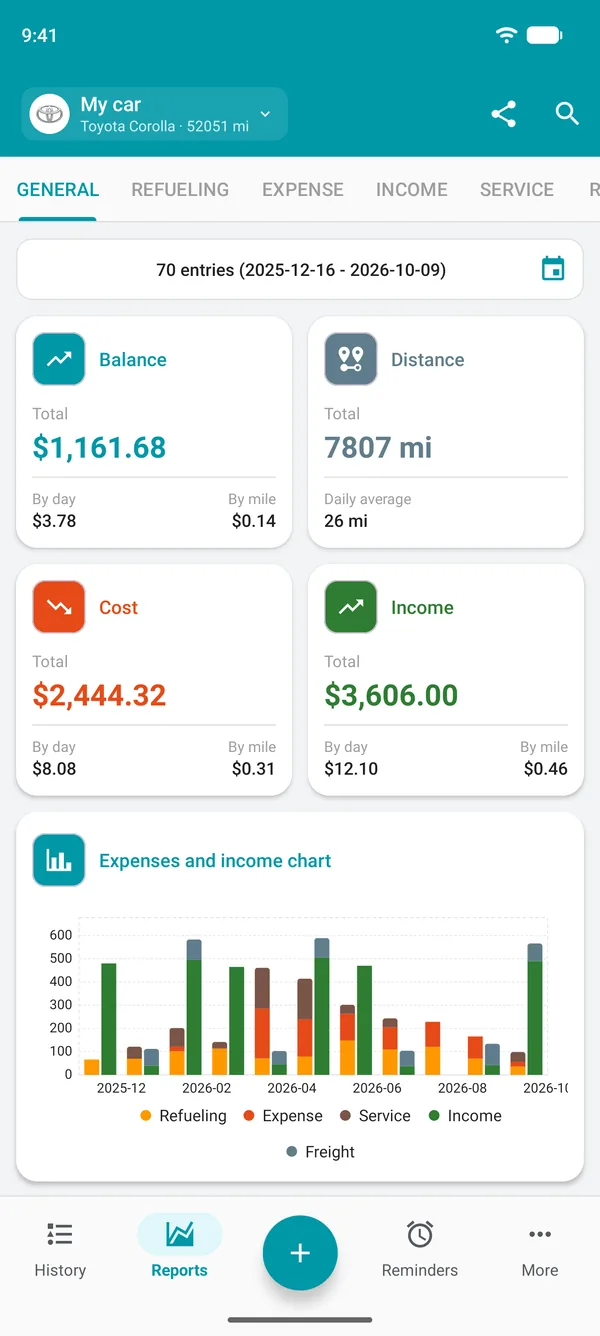
In Reports, the General tab shows the Balance, Cost, and Income for the period, per day, and per mile. In History, each month has its own summary.
Profit per mile: how to calculate it
Add up your earnings for the period and subtract all vehicle costs. Divide the result by the distance driven during that period. Include miles driven without a passenger, since those trips also use fuel and wear out tires.
In the app, the Balance on the General tab already does this math. Fuel from your last fill-up only counts after the next one, because it's still in the tank.
Income
How much you earn and spend per mile
In reports, the per-mile value for Income is what you earn for each mile driven, and the value for Cost is what you spend. If earnings fall below costs, you're losing money, even if your account balance looks healthy.
Reports
Earnings from each app, kept separate
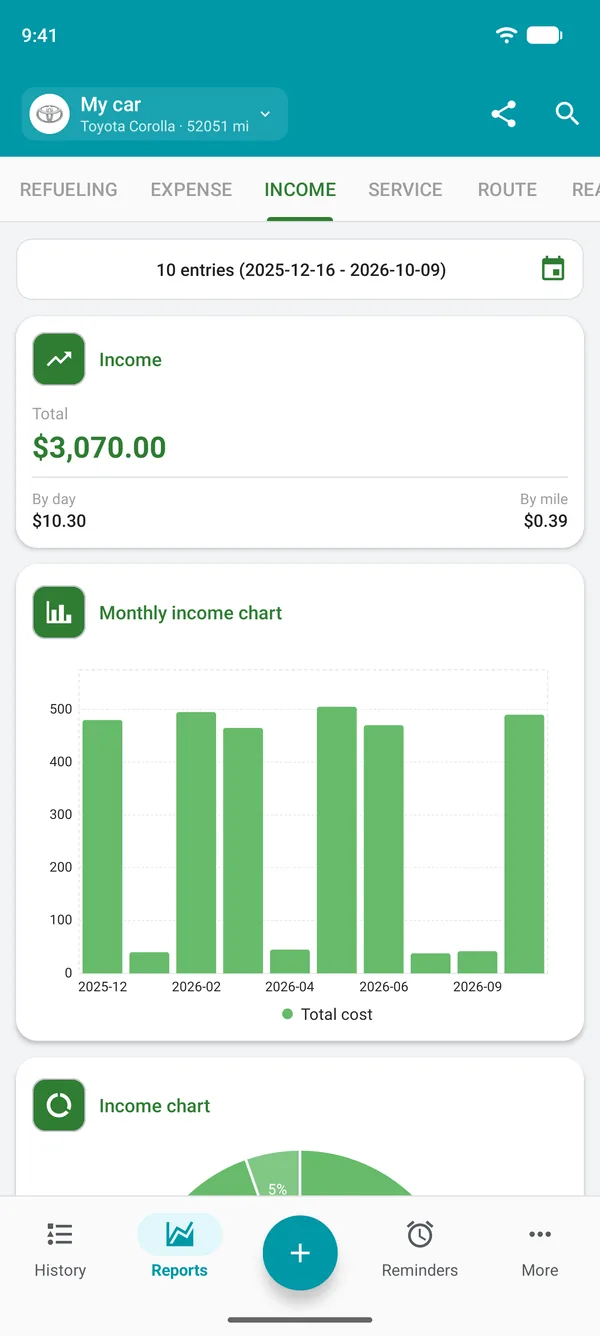
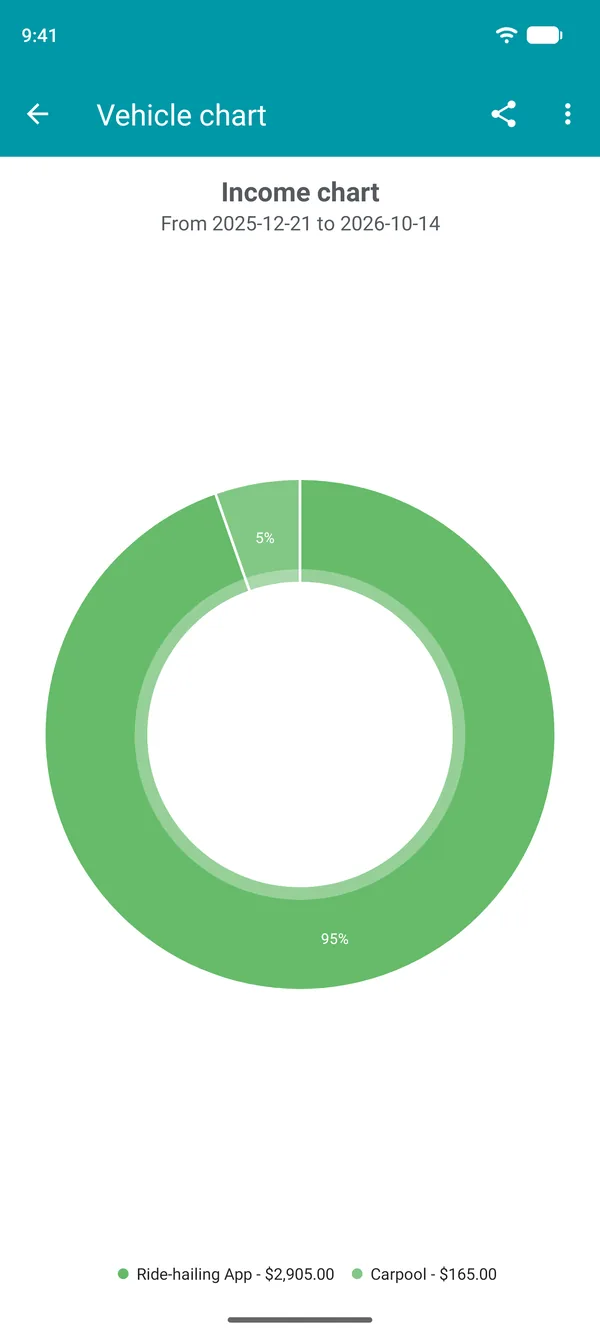
In More > Types of income, create one type for each app, one for tips, and another for bonuses. On the Income tab in reports, the Income chart shows each one's share of the total, so you can see which app brings in the most money.
Month by month on the costs and income chart
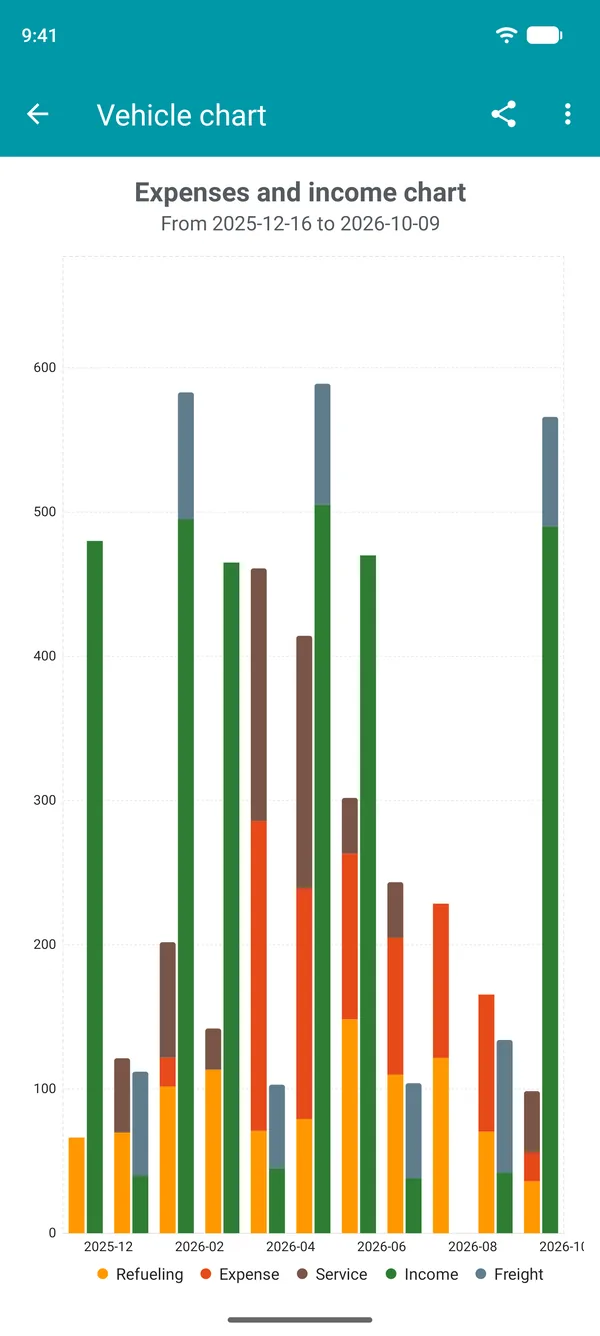
On the General tab, the Expenses and income chart shows two bars for each month: one for costs and one for earnings. Tap a bar to see that month's balance. This makes it easy to spot the good months and the slow ones.
Shifts and freight in Routes
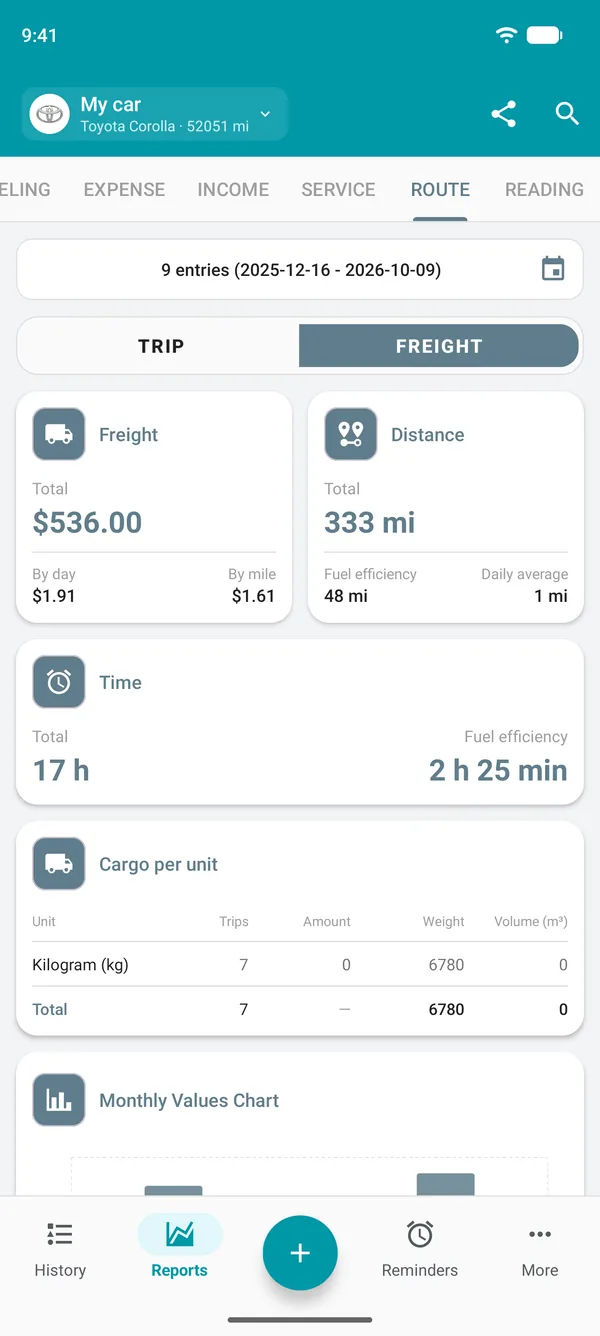
In Route, log where you started, where you arrived, the odometer reading, and the time. The report shows the distance and time for each period.
If you haul freight, use the Freight option: the Freight value counts as income. The per-distance value of the Trip option is for reimbursement and doesn't count as earnings.
Car or motorcycle, owned or rented
Log vehicle rental as an expense using a type you create. Each vehicle has its own reports: the Free plan allows up to 2 active vehicles, and on the Web, the All option combines the vehicles' data.
App or spreadsheet
A spreadsheet takes formulas, a computer, and the discipline to enter everything later. In the app, you log it on the spot, even offline, and the balance updates automatically. If you want the numbers in a spreadsheet, you can export your records on the paid plans.
What's free and what's in the paid plans
On the Free plan
- Unlimited fill-ups, expenses, and services
- Reports showing balance, costs, and income, per day and per mile
- One income entry per vehicle per month, which can be the month's total
On the paid plans
- Unlimited income entries, per ride or per day
- Profit per mile in each month's summary in History
- No ads, plus exports and attachments
Frequently asked questions
What's the best app for rideshare drivers to track earnings and expenses?
Look for an app that brings earnings and costs together, shows your profit per mile, works offline, and keeps vehicles separate. Drivvo does all of that on Android, iPhone, and the web.
How do I calculate profit per mile?
Add up your earnings, subtract all vehicle costs, and divide by the distance driven during the same period. Example: with 1,000 in earnings, 400 in costs, and a distance of 600, your profit is 1 per mile. In the app, Balance on the General tab does the math.
How much does a rideshare driver earn per mile?
It depends on the city, the app, the time of day, and the type of vehicle. The number that matters is yours: in the reports, the per-mile income value shows how much you earn for each mile driven.
How do I find my vehicle's cost per mile?
Add up all vehicle costs, not just fuel, and divide by the distance driven. In the app, the per-mile value of Cost does the math using your records.
Does Drivvo import rides from the apps?
No. Enter your earnings in Drivvo per ride, per day, or as a monthly total.
Does Drivvo track distance by GPS?
Not currently. Distance comes from the odometer reading you enter when you fill up or log income or an expense.
Is Drivvo free for people who drive for work?
The Free plan includes unlimited fill-ups, expenses, services, and reports, plus one income entry per vehicle per month, which can be the monthly total. Paid plans unlock unlimited income entries and remove ads.
Spreadsheet or app: which is better?
A spreadsheet works if someone enters everything later. In the app, you log it on the spot, and your balance updates automatically. Paid plans let you export your records to a spreadsheet.
Does it work for delivery riders, taxi drivers, and freight haulers?
Yes. The app handles cars, motorcycles, and trucks. In Route, the Freight option logs the amount earned for each freight job as income.
Can I keep earnings from each app separate?
Yes. Create an income type for each app. The Income chart shows each app's share of the total.
How do I see how much profit I made this month?
In Reports, select the month in the date filter. The Balance shows what you have left, and the Expenses and income chart compares months.
See what's left at the end of the month
Download Drivvo, log this week's earnings and expenses, and see your profit per mile.