
Vehicle maintenance tracker with reminders by date or mileage
Log every oil change, service and repair, along with the odometer reading and cost. Drivvo works out when maintenance is next due and reminds you in advance, based on whichever comes first: the date or the mileage.
- Reminders that recalculate the next due date every time you log a service
- A history of what was done, where and how much it cost
- For the family car and the company fleet


Rated 4.8 on Google Play, with more than 5 million downloads
Maintenance tracking for fleets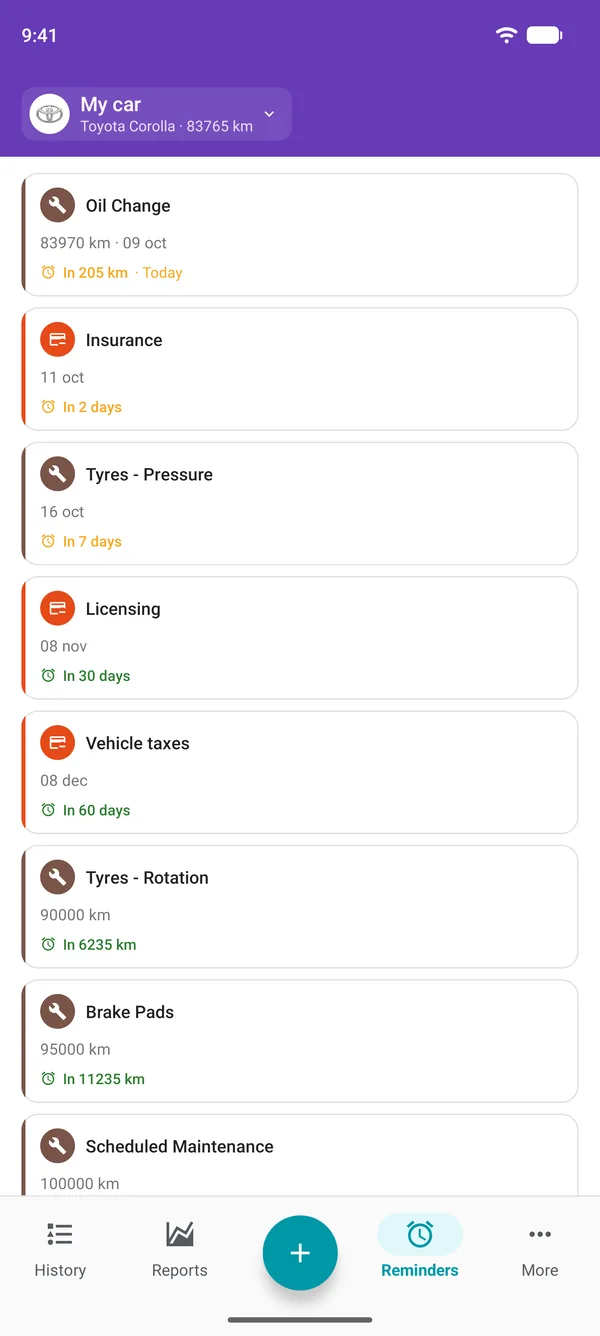
What is vehicle maintenance tracking?
Maintenance tracking means knowing what was done to the vehicle, when and at what mileage, and what comes next. With that record, oil changes, scheduled services and tyres no longer depend on memory or the sticker the garage left on the windscreen.
In the app, tracking brings two things together: a history of completed services and alerts for what's due next. Every service you log forms the basis for the next forecast, and the cost of keeping the vehicle running stays in plain sight.
How to track maintenance in Drivvo
Three steps, then the app keeps track for you. It works on Android, iPhone and the Web.
Log the service
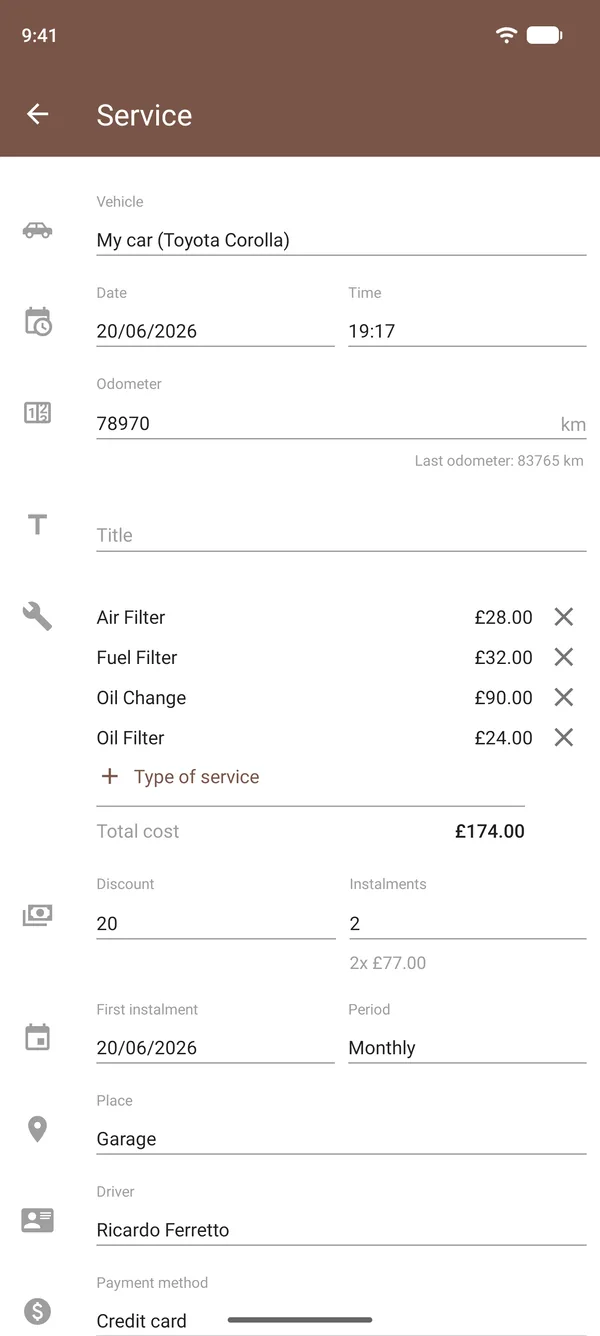
In Services, choose one or more types, such as oil change, filters, tyres and brakes, along with the cost of each, the date, the odometer reading and the location. To get started, log your most recent service.
Create the reminder
In Reminders, choose the type of service, tap Repeat every and enter a distance, a time interval or both. The expected date and mileage for the next service appear straight away, based on the last service of the same type.
Get the alert
As the due date approaches, the reminder appears at the top of History and you get a notification on your phone. Once the service is done, log it in the app and the reminder starts counting down to the next one.
Reminders by date or mileage: whichever comes first
If you drive a lot, you'll reach the mileage first; if you drive less, you'll reach the deadline in days or months. With both in the same reminder, the alert is triggered by whichever comes first.
Once or every time
The Just one time option is for a one-off task, such as replacing the timing belt at a set mileage. With Repeat every, the reminder renews whenever you log the service.
Forecast from your history
The app adds the reminder interval to the date and odometer reading of the last service of the same type. To work out how much is left, it uses the current mileage from your refuelling and other entries.
Advance notice your way
In Settings, you choose how many days or miles in advance the reminder starts to appear, giving you time to book the garage.
Notifications that don't nag
You'll get a notification when the advance warning period begins and on the due date. If you haven't logged the service, you'll be reminded again, but not every day.
Expenses too
Insurance, registration and taxes can be added as expense reminders by date, alongside maintenance reminders.
Suggestions to get started
The app suggests common reminders, such as oil changes, scheduled maintenance and tyre rotation, so you don't have to start from scratch.
Preventive maintenance schedule: reference intervals
The intervals most often quoted by manufacturers and garages for cars. Use them as a starting point and check your vehicle's owner's manual.
| Service | Reference interval | Notes |
|---|---|---|
| Oil Change | 3,000–6,000 mi or 6–12 months | Synthetic oil usually allows the longer interval; heavy use calls for the shorter one. |
| Oil Filter | At every oil change | Some manufacturers recommend a new filter at every other oil change. |
| Air Filter | 6,000–12,000 mi or 12 months | On unpaved roads or in dusty conditions, replace it sooner. |
| Brake Fluid | 2 years | Brake fluid absorbs moisture over time, even with little use. |
| Brake Pads | 6,000 mi | Interval for checking; replacement depends on wear. |
| Belts | 25,000–60,000 mi | A broken timing belt can damage the engine: follow the interval in the manual exactly. |
| Coolant | 2–5 years | Between changes, check the level when the engine is cold. |
| Tyres - Rotation | 5,000–6,000 mi | Evens out wear and makes the tyres last longer. |
| Tyres - Alignment/Balancing | 6,000–12,000 mi | Also check it if the steering pulls to one side or the steering wheel vibrates. |
| Tyres - Pressure | 2 weeks | With cold tyres, inflate to the pressure recommended by the manufacturer. |
| Battery | 2–5 years | Average lifespan; slow starts are the first sign of wear. |
| Scheduled Maintenance | 6,000 mi or 12 months | Under warranty, follow the manufacturer's service schedule. |
Your owner's manual takes precedence over any table: it gives the intervals for your engine and explains what counts as heavy use, such as heavy traffic, short journeys, dust, towing or many hours on the road each day. In those cases, intervals are shorter. Motorcycles and lorries have their own schedules.
Every row in this table can become a reminder in Drivvo, using the distance and time from your manual.
Preventive, predictive and corrective maintenance
All three are part of owning any vehicle. What sets them apart is when you decide to carry out the work.
Preventive
Carried out at set time or mileage intervals, before something fails: oil, filters, belts and fluids. This is what reminders cover and what best helps avoid costly repairs.
Predictive
Based on a part's condition: brake pad thickness, tyre tread, battery charge or a new noise. Record the measurement in the service notes to compare it at the next visit.
Corrective
A repair after a breakdown. It's worth logging too: the history shows what skipping preventive maintenance cost and which parts keep needing work at the garage.
Services
Vehicle maintenance history
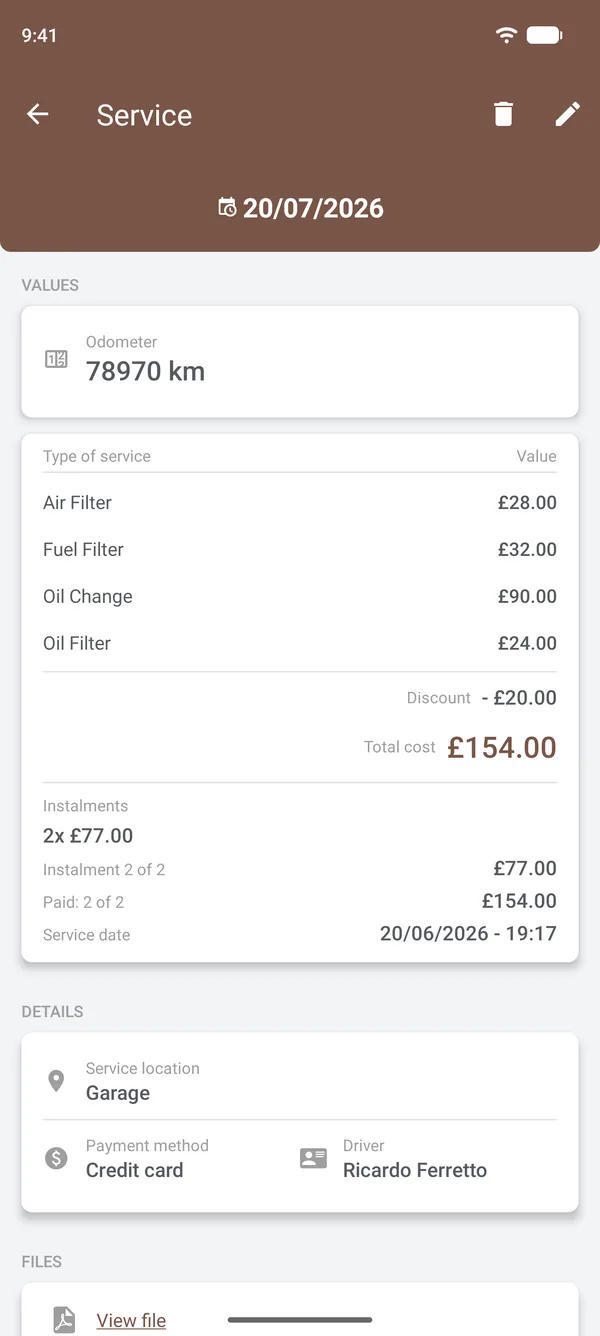
Each service is saved with the vehicle, including the date, odometer reading, items and their costs, location, payment method and driver.
- Multiple items in one service, with discounts and instalments
- Invoices and photos attached on paid plans
- A timeline that helps prove work was done when selling the vehicle or making a warranty claim
- The same records on your phone and computer, kept in sync
Reports
How much your vehicle's maintenance costs
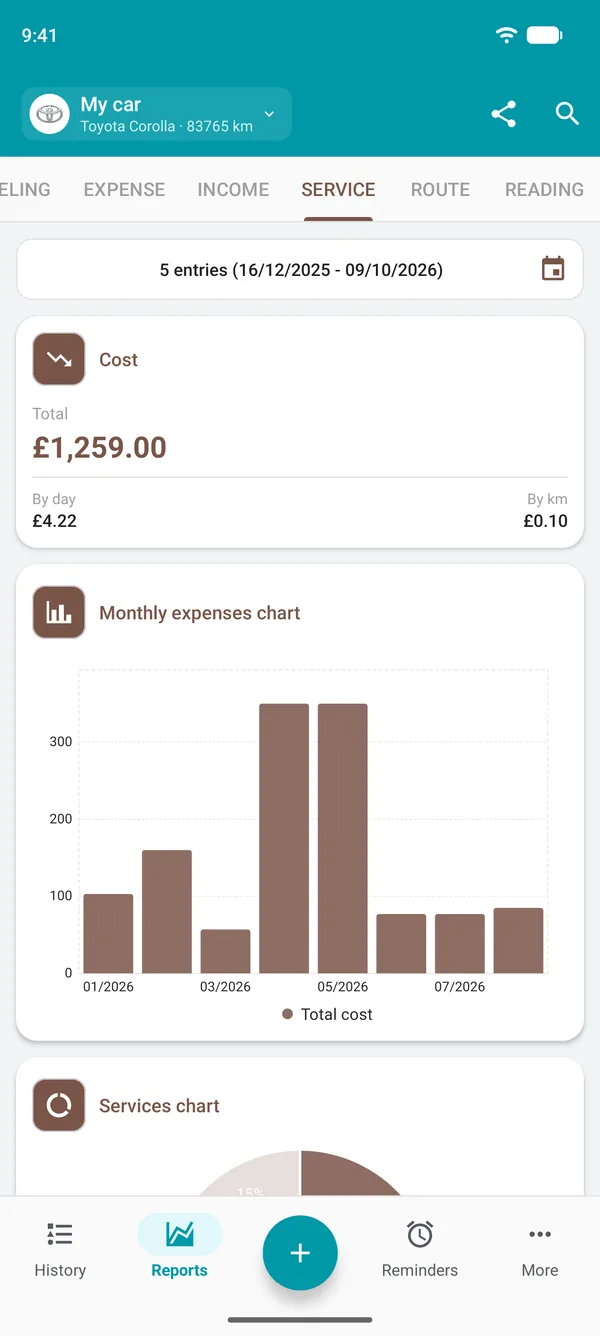
The Services report totals your spending for the period and shows it in three ways.
Total, per day and per mile
With the cost per mile, you can compare vehicles and estimate how much maintenance will cost as you drive.
Month by month
The monthly chart shows which months had higher spending and helps you plan future services.
By type of service
Tyres, brakes or oil: the chart by type shows where most of the money goes.
Fleet maintenance tracking
In a company, each vehicle has its own reminders and history, and the manager can track the whole fleet in the app or on the web.
- Drivers log services on their phones, and their profile determines what they can see and edit.
- Each vehicle's mileage updates with refuelling and checklists, and reminders use it to work out how much is left.
- Maintenance costs appear per vehicle in reports, alongside fuel and expenses.
- Each driver's licence expiry date is in the user list.
Maintenance app or spreadsheet?
A spreadsheet works as long as someone remembers to open it. It doesn't know the current odometer reading, won't remind you about an oil change and usually sits on one person's computer.
In the app, you can log the service there and then, at the garage, and the forecast updates with every new entry. If you already have a spreadsheet, Drivvo support can import the data into the app.
Frequently asked questions
What is vehicle maintenance tracking?
It's a record of work done on the vehicle, with the date, mileage and cost, plus a reminder of what's next. It helps you keep up with oil changes and scheduled services and shows how much maintenance costs.
What is the best app for tracking car maintenance?
One that keeps a history and reminds you by date and mileage. Drivvo does this on Android, iPhone and the web, for cars, motorbikes, lorries and fleets. It also tracks refuelling and expenses.
Is Drivvo free?
Yes. The Free plan lets you log services and create reminders for up to 2 active vehicles, with ads. Paid plans remove ads and unlock more vehicles and attachments for invoices and photos. For companies, the Fleet plan has a 15-day free trial.
Should I change the oil based on mileage or time?
Whichever comes first. Oil deteriorates with use and over time, even when the vehicle is not driven. That is why the Drivvo reminder takes both limits into account.
How long can I delay an oil change?
Ideally, not at all. Old oil protects the engine less, and delaying a change could affect your warranty. The reminder gives you time to book the change before it is due.
How do I know when my last oil change was?
If you logged it as a service, you can find it in the history with the date and odometer reading. The oil change reminder shows when the next one is due. If you have no record, check the garage's sticker or invoice and log the change in the app. The countdown starts from there.
What does preventive maintenance include?
Oil and filter changes, plus checks of the brakes, tyres, belts, fluids, battery, lights and suspension at the intervals in the manual. The table on this page shows the most common intervals.
What are the types of vehicle maintenance?
Preventive, done on schedule; predictive, based on the condition of parts; and corrective, after a fault. You can log all three as a service in Drivvo.
What happens if I skip scheduled maintenance?
Wear builds up unnoticed: old oil, worn brake pads, an ageing belt. Repairs usually cost more than prevention, the vehicle becomes less safe, and you could lose your warranty if the manufacturer requires servicing.
Does logging maintenance help with the warranty and resale?
Yes. A history with dates, mileage, garage details and costs shows that you followed the service intervals. For the warranty, keep any receipts the manufacturer requires. On paid plans, you can attach them to the service.
How do I set up a fleet maintenance plan?
Use each model's manual to create a reminder for every maintenance item on each vehicle, based on distance and time. Odometer readings come from drivers' refuelling records and checklists, while the manager can track upcoming work and each vehicle's costs.
Will I get an alert without opening the app?
Yes, on Android and iPhone, as long as Drivvo notifications are enabled on your device. On the Web, reminders appear on the Reminders screen.
Start with your last oil change
Download Drivvo, log your most recent service and let the app remind you when the next one is due.
Looking after several vehicles? Discover the Fleet plan